Rust 开发初探:从安装到第一个桌面计算器
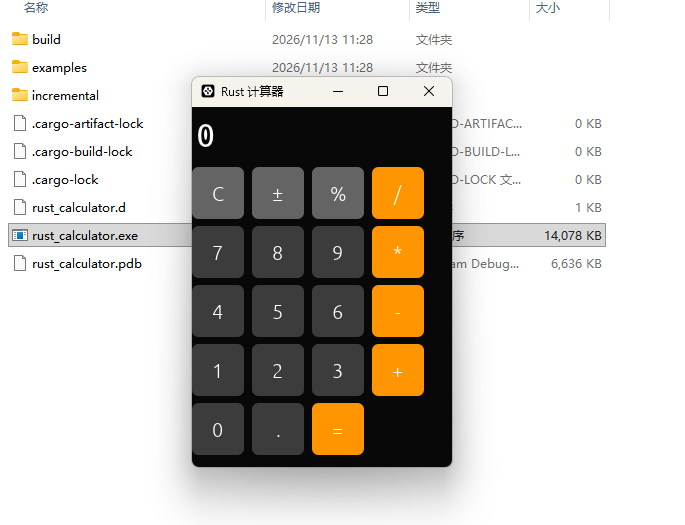
本文记录一次完整的 Rust 上手过程:下载安装、验证环境、用 egui 写一个桌面计算器、运行程序,以及解决双击 exe 出现黑框的问题。
一、下载与安装
Rust 官方推荐通过 rustup 安装。在 Windows 上访问 rustup 官网,下载 rustup-init.exe 并运行。
安装向导中选择 1) 默认安装。安装程序会下载并安装稳定版工具链(rustc、cargo、rust-std 等),过程中需要联网,耗时取决于网速。完成后会提示按回车继续,窗口随即关闭——这是正常现象,不代表安装失败。
二、验证安装是否可用
打开一个新的终端窗口(CMD 或 PowerShell),执行:
rustc --version
cargo --version
正常输出类似:
rustc 1.100.0 (0ef1bc386 2026-11-09)
cargo 1.100.0 (3acc79c0c 2026-11-05)
两个命令都能打印版本号,说明编译器与包管理器均已安装,且 PATH 环境变量配置正确。
还可以用 rustup show 查看当前默认工具链和已安装组件。如果提示“不是内部或外部命令”,通常是旧终端没有加载新环境变量,关掉重开即可。
三、开发一个桌面计算器
选择 egui 框架:它是 Rust 生态中上手较快的即时模式 GUI 库,不需要额外安装系统 GUI 依赖。
1. 创建项目
cargo new rust_calculator
cd rust_calculator
2. 添加依赖
编辑 Cargo.toml:
[dependencies]
eframe = "0.37"
eframe 封装了 egui 和窗口创建逻辑。
3. 编写代码
src/main.rs 的核心结构包括:
CalculatorApp结构体保存显示内容、操作数、运算符和状态标志;press_digit/press_operator/equals/clear等方法处理按键逻辑;impl eframe::App中实现界面绘制与按钮点击分发。
注意 eframe 0.37 的 App trait 使用 fn ui(&mut self, ui: &mut egui::Ui, frame: &mut eframe::Frame),而不是旧版本的 update 方法。界面里用 egui::Button 构建 4×5 的按钮网格,运算符用橙色、功能键用灰色、数字用深灰色区分。
运算逻辑支持加、减、乘、除、清零、小数点、正负号和百分比,除零时显示“错误”。
4. 运行
cargo run
首次编译需要下载并构建约两百个依赖 crate,耗时较长;之后增量编译会快很多。编译成功后弹出窗口,即可使用计算器。
四、双击 exe 出现黑框的原因与改进
编译产物位于 target/debug/ 或 target/release/。直接双击 exe 时,会先弹出一个黑色控制台窗口,然后才出现计算器界面。
原因:Rust 在 Windows 上默认把程序编译为“控制台应用”,系统会为其分配控制台。即使程序本身是 GUI,这个控制台也会出现。
改进方法:在 src/main.rs 文件最开头(任何 use / mod 之前)加入:
#![cfg_attr(not(debug_assertions), windows_subsystem = "windows")]
然后重新执行:
cargo build --release
再去 target/release/ 双击 exe,黑框不再出现。
这行属性的含义是:在非调试(release)模式下将程序标记为 Windows GUI 子系统,不附带控制台;保留 not(debug_assertions) 条件,是为了开发时用 cargo run 仍能看到控制台输出,方便排查错误。
五、小结
rustup-init.exe默认安装即可,装完用rustc --version和cargo --version验证;- 小型桌面工具用 egui/eframe 开发成本低,
cargo run一条命令即可运行; - eframe 0.37 的
Apptrait 用ui方法而非update,迁移旧示例时要注意; - Windows 下 GUI 程序双击出现黑框,用
windows_subsystem = "windows"属性并在 release 模式下编译即可消除。 - 至此,一个从零安装到可运行桌面应用的 Rust 开发流程就完整走通了。
##附源代码
#![cfg_attr(windows, windows_subsystem = “windows”)]
use eframe::egui;
fn main() -> eframe::Result {
let options = eframe::NativeOptions {
viewport: egui::ViewportBuilder::default()
.with_inner_size([260.0, 360.0])
.with_resizable(false),
…Default::default()
};
eframe::run_native(
“Rust 计算器”,
options,
Box::new(|_cc| Ok(Box::new(CalculatorApp::default()))),
)
}
#[derive(Default)]
struct CalculatorApp {
display: String,
operand: f64,
operator: Option,
reset_on_next_digit: bool,
}
impl CalculatorApp {
fn press_digit(&mut self, digit: char) {
if self.reset_on_next_digit {
self.display.clear();
self.reset_on_next_digit = false;
}
if self.display == “0” && digit != ‘.’ {
self.display.clear();
}
if digit == ‘.’ && self.display.contains(‘.’) {
return;
}
self.display.push(digit);
}
fn press_operator(&mut self, op: char) {
    if let Ok(current) = self.display.parse::<f64>() {
        if let Some(prev_op) = self.operator {
            // 连续运算时先结算上一步
            self.operand = Self::calculate(self.operand, current, prev_op);
            self.display = self.format_result(self.operand);
        } else {
            self.operand = current;
        }
        self.operator = Some(op);
        self.reset_on_next_digit = true;
    }
}

fn calculate(a: f64, b: f64, op: char) -> f64 {
    match op {
        '+' => a + b,
        '-' => a - b,
        '*' => a * b,
        '/' => {
            if b == 0.0 {
                f64::NAN
            } else {
                a / b
            }
        }
        _ => b,
    }
}

fn format_result(&self, val: f64) -> String {
    if val.is_nan() {
        "错误".to_string()
    } else if val.fract() == 0.0 && val.abs() < 1e15 {
        format!("{:.0}", val)
    } else {
        format!("{}", val)
    }
}

fn equals(&mut self) {
    if let (Some(op), Ok(current)) = (self.operator, self.display.parse::<f64>()) {
        let result = Self::calculate(self.operand, current, op);
        self.display = self.format_result(result);
        self.operator = None;
        self.reset_on_next_digit = true;
    }
}

fn clear(&mut self) {
    self.display = "0".to_string();
    self.operand = 0.0;
    self.operator = None;
    self.reset_on_next_digit = false;
}
}
impl eframe::App for CalculatorApp {
fn ui(&mut self, ui: &mut egui::Ui, _frame: &mut eframe::Frame) {
ui.add_space(10.0);
ui.horizontal(|ui| {
ui.add_space(4.0);
let display_text = if self.display.is_empty() { “0” } else { &self.display };
ui.label(
egui::RichText::new(display_text)
.size(32.0)
.monospace()
.color(egui::Color32::WHITE),
);
});
ui.add_space(10.0);
    let buttons = [
        ["C", "±", "%", "/"],
        ["7", "8", "9", "*"],
        ["4", "5", "6", "-"],
        ["1", "2", "3", "+"],
        ["0", ".", "=", ""],
    ];

    for row in buttons.iter() {
        ui.horizontal(|ui| {
            for &label in row.iter() {
                if label.is_empty() {
                    continue;
                }
                let btn = egui::Button::new(
                    egui::RichText::new(label).size(20.0).color(egui::Color32::WHITE),
                )
                .min_size(egui::vec2(52.0, 52.0));

                let btn = if "+-*/=".contains(label) {
                    btn.fill(egui::Color32::from_rgb(255, 149, 0))
                } else if label == "C" || label == "±" || label == "%" {
                    btn.fill(egui::Color32::from_rgb(100, 100, 100))
                } else {
                    btn.fill(egui::Color32::from_rgb(60, 60, 60))
                };

                if ui.add(btn).clicked() {
                    match label {
                        "0" | "1" | "2" | "3" | "4" | "5" | "6" | "7" | "8" | "9" | "." => {
                            self.press_digit(label.chars().next().unwrap());
                        }
                        "+" | "-" | "*" | "/" => {
                            self.press_operator(label.chars().next().unwrap());
                        }
                        "=" => self.equals(),
                        "C" => self.clear(),
                        "±" => {
                            if let Ok(v) = self.display.parse::<f64>() {
                                self.display = self.format_result(-v);
                            }
                        }
                        "%" => {
                            if let Ok(v) = self.display.parse::<f64>() {
                                self.display = self.format_result(v / 100.0);
                            }
                        }
                        _ => {}
                    }
                }
            }
        });
        ui.add_space(4.0);
    }
}
}